Growatt SPH
Read the instruction below on how to connect a growatt inverter to Zatobox system.
- Growatt SPH single phase
- Growatt SPH 3 phase
Prerequisite
- Zatobox one
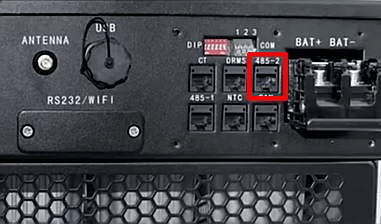
Step 1 - Connect inverter monitoring cable
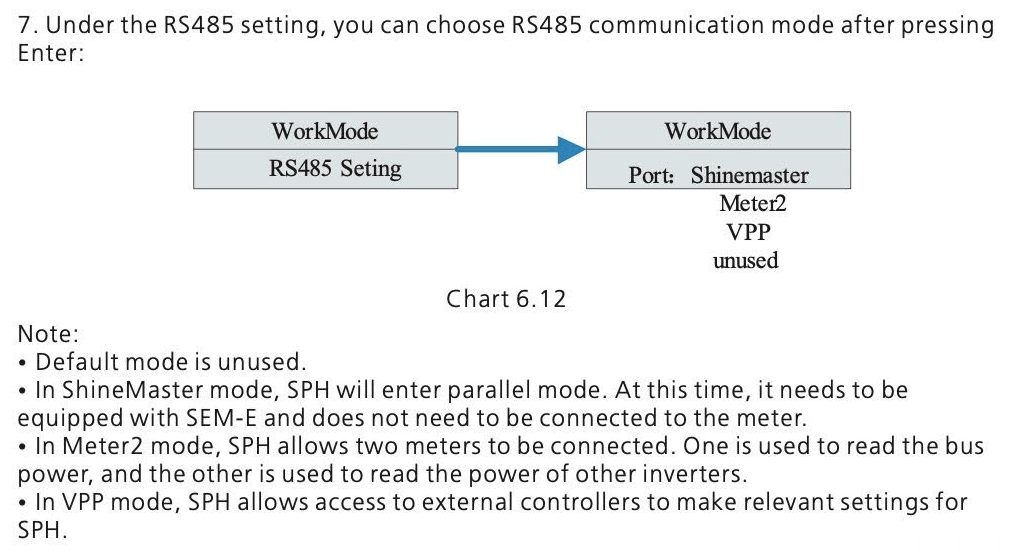
In your inverter settings. Set the RS485 port setting to VPP mode (see troubleshooting below).
We don't currently sell an RS485 cable for this port, but you can make your own cable by buying a USB to RS485 adapter and cutting a normal computer network cable or crimping an RJ45 plug.
 |  |
|---|
Step 2 - Configure zatobox to monitor a Growatt SPH inverter
Troubleshooting
If you do not get a reponse from your SPH inverter via RS485, try pins 4 and 5 instead as shown in the official Growatt SPH documentation below.

If you are unable to find VPP mode on your inverter, it should be available under WorkMode/RS485 as described in the Growatt SPH documentation: